Posts

Showing posts with the label Composite Applications

Creating Composite Application with Care

Image
A big part of Notes 8 has been the ability to create and run composite applications. Regardless on how you create composite applications whether the IBM way or Richard's way, you need to really understand the audience that you are developing the application for before you venture into composite applications. Composite applications are great in tying different components together to create a visual relationship between data. For the Notes 8 client this can be done by displaying different components in different frames that are linked together. However, this is not always the best way of displaying the information. For example, netbooks are now very popular with a number of sales staff that we have been working with. The typical screen resolution of netbooks are 1024 x 576 much shorter that the typical laptop with 1024 x 768. Therefore, screen real estate is very precious. As the results, composite applications like the Lead Manager composite application example from IBM becom...

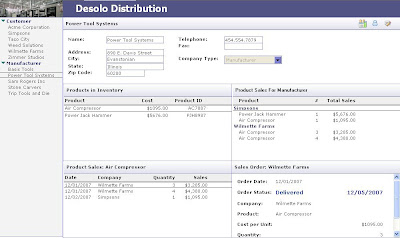
Creating Composite Applications for Classic Lotus Notes Clients – Part 2

Image
This is part 2 of my creating composite application for classic Lotus Notes clients. In part 2, I will cover how a new event in Lotus Notes 8 can used to simplify the process of creating a composite application. You can download the demo code from the sidebar or download it from here. This new event is "onSelect" and is found in Notes View. This event works not only for regular views but also for embedded views and even embedded views within a dialog box. This event is triggered whenever a document is selected in a view. It hold true even when the view is display for the first time. As a Notes developer, I feel this one single event is more than enough reason to upgrade to at least the Lotus Notes 8 Basic client. It makes a number of UI issues simply go away. Just like in the previous Lotus Notes clients we need to create a launch document in our composite application that will be used to trigger the population of the frames in the composite application. However, rather than ...

Creating Composite Applications for Classic Lotus Notes Clients – Part 1

Image
A new thing in Lotus Notes 8 is the ability to create composite applications using the Eclipse Lotus Notes 8 client. It is a powerful feature to aggregate visually information from different sources. It leads to a simpler looking interface with powerful results. Since I am an advocate of smaller lightweight clients, I wondered if composite applications could be created for the classic Lotus Notes clients including Notes 5, 6, 7, and the Notes 8 Basic client. The classic clients are much smaller that the Eclipse-based client and loads up much faster than its Eclipse counterpart. After experimenting for a few hours, I discovered that the answer is yes, “you can teach an old dog to do new tricks.” Though, it is possible with the Notes 5 client, it is buggy and I would not recommend it. I have divided the presentation here into two parts, part 1 for Lotus Notes 7 and older clients and part 2 for the Lotus Notes 8 Basic client. The information that I am presenting here is an expansion of a ...